Free Job Card & Production Traveller Template
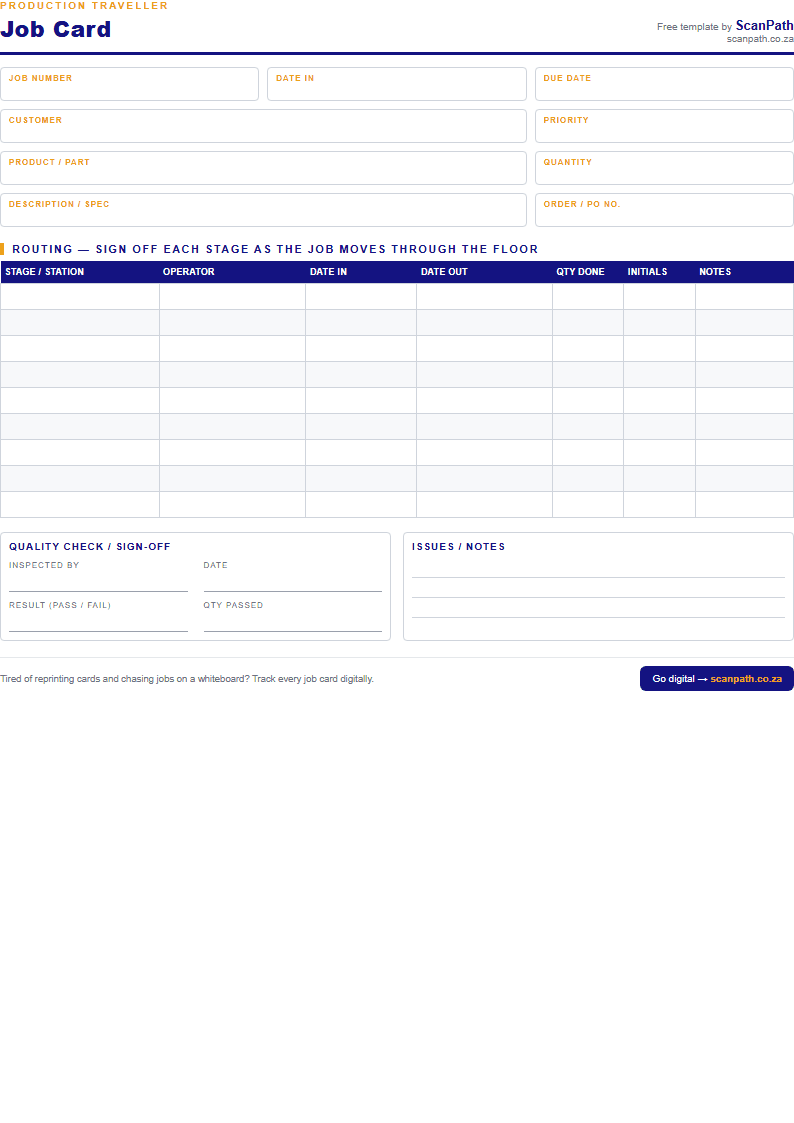
A clean, printable A4 sheet that travels with each job through your factory — record the routing, sign off every stage, and capture the quality check. Print as many as you need. Free, no email required.
What is a job card (production traveller)?
A job card — also called a production traveller, job traveller or router — is the sheet that travels with a job as it moves through your factory floor. Each station (cutting, welding, assembly, finishing, QC) records who worked on it, when, and how many units were done, then signs off before it moves on. It's the paper trail that answers "where is this job right now?" and "who touched it last?"
What's in this template
- Job details — number, customer, product/part, quantity, due date, priority, PO number
- A routing table — sign off each stage as the job moves through the shop floor
- Operator, date in / date out, quantity done and initials per stage
- A quality check / sign-off block with pass/fail and quantity passed
- An issues & notes section for anything that goes wrong
How to use it
- Download and print one sheet per job (A4).
- Fill in the job details at the top when the job is created.
- Staple it to the job or the pallet so it travels with the work.
- Each station fills in a routing row and signs off before passing it on.
- Office collects the finished card for costing, invoicing and records.
When paper starts to cost you
Paper job cards work — until one goes missing, gets coffee on it, or the whiteboard says one thing and the floor says another. When you're reprinting cards and walking the floor to find a job, it's time to go digital.
ScanPath is the same job card, on any phone. Print a QR code instead, and your team scans each job through the floor — the office sees where every job is, in real time. No hardware, no whiteboards, no lost cards.